
You can use the Block from booking setting on the Client Summary to prevent a client from booking appointments through Online Booking.
This can be helpful if you need additional control over who can book appointments with your practice.
How to block a client from booking
- Open the client’s record in WriteUpp.
- Click Edit Details on their profile.
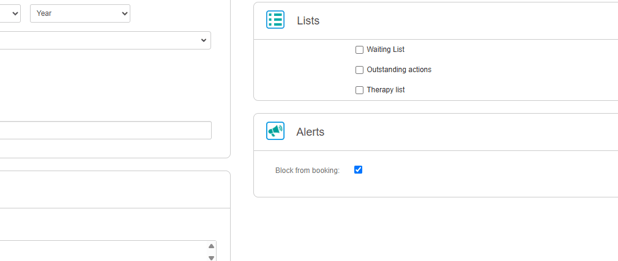
- Tick the Block from booking checkbox under Alerts:
- Save your changes.
The setting is switched off by default. You can return to the client’s profile and remove the block at any time.
What happens when a client is blocked?
Online Booking
WriteUpp checks the details entered during the booking process, including the client’s email address and mobile number. The check applies when the client:
- Verifies their identity using email or SMS during an Online Booking.
- Uses Online Booking when client verification is switched off and enters details that match an existing blocked client record.
If WriteUpp identifies the person booking as a blocked client, they won’t be able to complete their booking.
They’ll see the following generic message after verifying or entering their details:
"Sorry, online booking is unavailable."
The message won't indicate to the client that this is because their record has been blocked.
Client Portal
When a blocked client signs in to the Client Portal, the Book an appointment option will be hidden.
This prevents them from starting a new booking from their portal account.
Bookings made in WriteUpp
The block also applies when a team member tries to book an appointment into the diary for the client through WriteUpp Desktop or the WriteUpp App.
A warning will explain:
This patient is blocked from making any bookings. Continue with booking?
The team member can then cancel the booking or choose to continue if the appointment should still be created.
The same warning also appears when adding the client to a group or block booking.
How to allow the client to book again
To remove the restriction:
- Open the client’s record.
- Select Edit Details on their profile.
- Under Alerts, untick the Block from booking checkbox.
- Save your changes.
The client will then be able to make bookings normally again.
Important information
WriteUpp identifies blocked clients using the personal and contact information entered during booking.
Although this provides an additional safeguard, it isn’t infallible. A determined person may still be able to create a booking if they use completely different details that are not linked to their blocked client record.