
You can choose who should be responsible for paying a patient's invoices by setting a default invoice payor in their patient settings.
This is particularly useful if a patient's invoices are usually paid by a next of kin or a third party, as you won't need to select the payor every time you create an invoice.
How to set a default invoice payor
- Find the patient in WriteUpp and make them the active client.
- Go to the Patient Summary using the Active Client button and open the Settings tab.
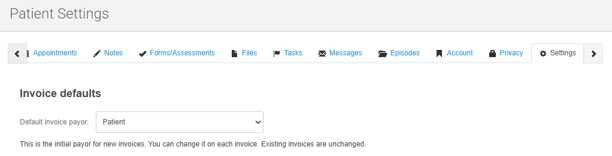
- Under Invoice defaults, you'll see the option to choose a default payor.
- Select who should be responsible for paying the patient's invoices from the dropdown.
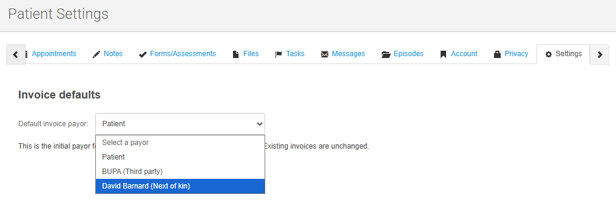
- Click Save to save your preference.
Your updated selection will be used for new invoices created through Quick Invoice or Create → Invoice.
Important: Changing the default invoice payor won't affect invoices you've already created.
You can choose from:
- Patient – the patient will be responsible for paying their invoices.
- Next of kin – select an active next of kin associated with the patient.
- Third party – select a third party already linked to the patient.
Please note: If you haven't set a default invoice payor, the patient will automatically be selected. Only active next of kin and linked third parties can be saved as defaults.
How does this work when creating invoices?
Once you've saved a default invoice payor, WriteUpp will automatically select them when you create a new invoice using either:
- Quick Invoice
- Create → Invoice
This saves you having to select the same payor each time you invoice the patient.
If you've selected a third party, their saved details, including their name, address and available cover information, will be pulled through to the invoice.
Can I change the payor on an individual invoice?
Yes! Your saved preference is simply the default selection.
When creating an invoice, you can still choose a different payor before saving it, without changing the patient's saved default.
For example, if a patient's invoices are normally paid by a third party but they need to pay for a particular appointment themselves, you can select the patient as the payor for that invoice instead.
What happens if the selected payor is no longer available?
If a next of kin is deactivated or a third party is removed from the patient's record, their saved default will no longer be available.
WriteUpp will let you know that the selected payor is unavailable, and you'll need to choose a valid payor before creating another invoice.
This helps prevent invoices from being created with incorrect payor details.