
This release introduces two exciting new additions to WriteUpp: the new Client Portal, giving clients a secure and convenient way to manage their appointments online, and the first version of the WriteUpp Open API.
Alongside these headline features, we've delivered a wide range of improvements across the platform, including enhancements to AI-powered tools (including a new beta AI chat assistant in the Form Builder) and a variety of performance optimisations designed to improve the overall WriteUpp experience.
Read on to discover everything that's new in v2.17.23.
New Features
New: Client Portal for Secure Online Appointment Management
We’re excited to introduce the new Client Portal into WriteUpp! This new feature is designed to give your existing clients a faster, easier and more flexible way to manage their appointments online.
The Client Portal allows clients to securely:
- View upcoming appointments
- View previous appointment history
- Change appointment dates and times online
- Cancel appointments online
- Leave messages for the clinic when making changes or cancellations
This helps reduce admin time for your practice while giving clients more control over their appointments, without needing to phone or email the clinic directly.
The new Client Portal won't be enabled automatically on your site. If you'd like to start using it, simply turn it on under Integrations & Add Ons → Online Booking → Configure → Client Portal tab.
Two Ways Clients Can Access the Portal
Appointment Magic Links:
You can add secure Client Portal magic links directly into appointment confirmation emails, reminders and update notifications using the new Magic Link or Magic URL variables.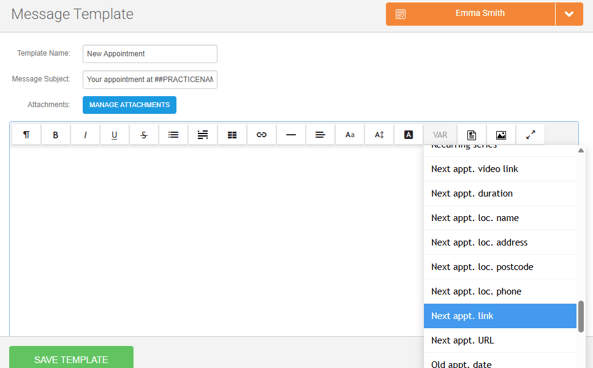
When a client clicks the link:
- They are taken directly to a secure portal authentication page for that specific appointment
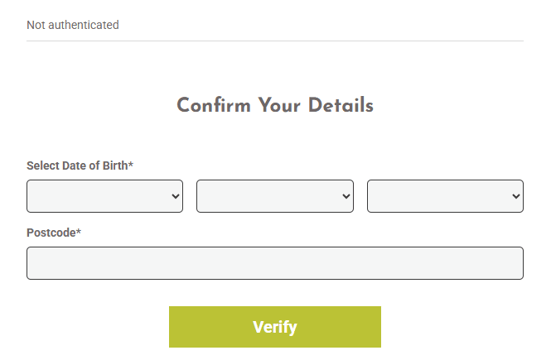
- They verify their identity using their Date of Birth and postcode
Note: Postcode is now a mandatory field in Online Booking 2.0, as it is required for Client Portal authentication. - They can then view, change, or cancel that appointment (depending on your portal settings)
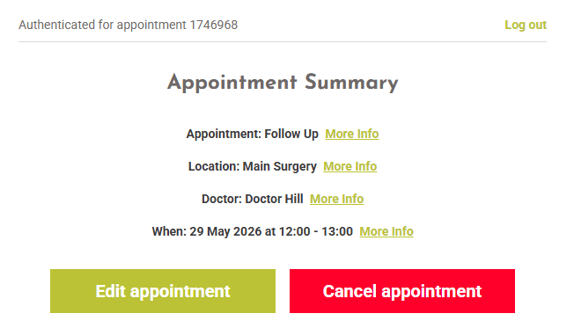
Note: This access method is appointment-specific for security reasons and does not allow the client to view any other appointments linked to their account.
Full Client Portal Login:
You can also provide clients with access to the full Client Portal experience. You can find your unique Client Portal link under the main menu → Integrations & Add Ons → Online Booking → Configure → Client Portal tab.
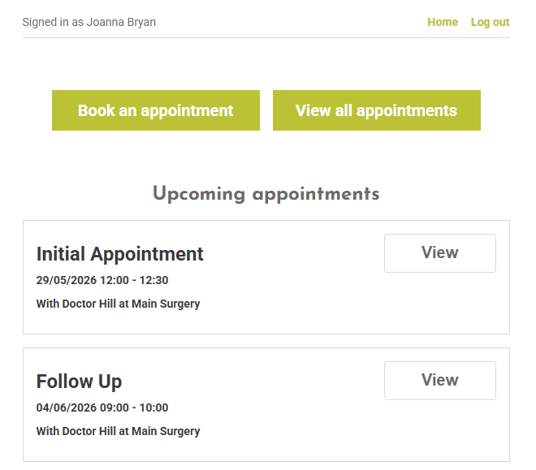
Using the full login, clients can:
- View all upcoming appointments
- View appointment history
- Manage eligible appointments online in one place
To access the full portal:
- The client enters their email address or mobile number
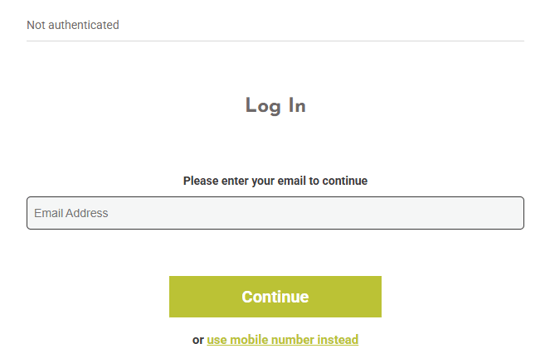
- A secure magic login link is sent to them
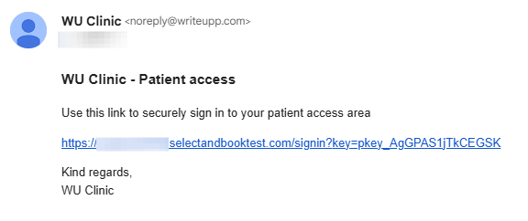
- They verify their identity using their Date of Birth and postcode
- They are then logged into the full Client Portal
Flexible Portal Controls
The Client Portal can be configured independently from Online Booking 2.0, giving your practice flexibility over how online appointment management is offered.
You can:
- Use Online Booking 2.0 and the Client Portal together
- Enable or disable each feature separately. For example, to allow existing clients to manage appointments online without enabling online booking for new patients
You can also configure:
- How close to an appointment clients can make changes
- How close to an appointment clients can cancel
- Cancellation policy wording shown before cancellation
- The appointment status automatically applied after cancellation
Configuration settings can be found under Integrations & Add ons → Online Booking → Configure → Client Portal tab.
Built Into Existing WriteUpp Workflows
When a client changes or cancels an appointment through the Client Portal:
- The user automatically receives notification within WriteUpp
- You can configure user email notifications for appointment updates made via the portal, either for appointments with your user only or for appointments with all users.
- Any message left by the client is stored against the appointment and client record
- Existing appointment communication change triggers can be used for appointment updates
IMPORTANT: The Client Portal is included as part of the Online Booking 2.0 add-on, and is not supported with Classic Online Booking. Learn how to switch from Classic to Online Booking 2.0 here.
Learn more about what the Client Portal has to offer here.
We're just getting started with the Client Portal! Keep an eye out for more exciting features and enhancements coming soon.
New: Open API for Third-Party Integrations
We've introduced the first version of the WriteUpp Open API, allowing Site Administrators to securely connect trusted reporting tools and third-party applications to their WriteUpp site without sharing staff login credentials.
This initial release provides read-only access to key areas of your site, including appointments, patients, users, invoices, locations, expenses, payment types, referral sources and more. API access is controlled using a site-level API key, which can be generated, regenerated, revoked and reinstated by Site Administrators. You can access it under the main menu → Integrations & Add Ons → Open API. 
The Open API is region-specific, so integrations must use the Public API URL shown on the Open API configuration page. More endpoints and functionality may be added in future releases.
Learn more about the WriteUpp Open API here.
Our Terms of Service have also been updated to cover the use of the Open API and third party integrations.
AI Form Builder Assistant (Beta)
We’ve introduced a new beta AI Chat Form Assistant within the Assessment Form Builder, making it quicker and easier to create and edit assessment forms using AI.
Important: The AI Form Assistant is currently a beta feature available for you to try. As we gather feedback and continue to review the feature, it may be changed, withdrawn or included as part of a premium add-on in the future.
When creating or editing a form template in the Form Builder, you can interact with the assistant through a chat-style panel. Simply type out the changes you’d like to make to the form and send this description to the assistant. For example, you could ask for a new section, field type changes or wording changes. The assistant will then update the form structure for you and provide a summary of the changes made.
Check out how the WriteUpp team have been using it below. In this example, we asked the assistant to create a new Client Details section, using smart fields where appropriate.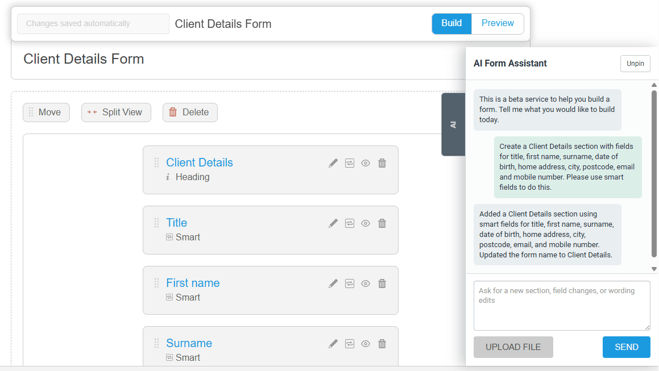
For best results, we recommend keeping prompts short, focused and descriptive.
Please note: The AI Form Assistant is currently available as a beta feature. While it can help speed up form creation and editing, results may not always be perfect and some manual adjustments may still be required.
The assistant also supports importing PDF and image copies of forms directly from the chat panel, helping you generate forms from existing documents more easily. If you upload a file through the assistant, it will replace the current form template, but you'll be asked to confirm before anything is overwritten.
Improvements
Improved Patient Search Matching
We’ve improved patient search matching to help return more accurate results, even when extra spaces are present in names. Patient searches will now ignore accidental leading, trailing or repeated spaces. For example, searching for “John Smith ” using the client search bar will correctly return “ John Smith” as a match.
We’ve also updated patient creation across both the app and desktop, as well as patient imports, so unnecessary spaces are automatically removed from the First Name and Last Name fields before saving.
In addition, existing patient records have been cleaned up to remove leading and trailing spaces from stored names.
New ‘User phone’ Variable
We’ve added a new ‘User phone’ variable which can be used across templates in WriteUpp, including appointment communications. The variable pulls through the value entered in the Mobile field on the user profile.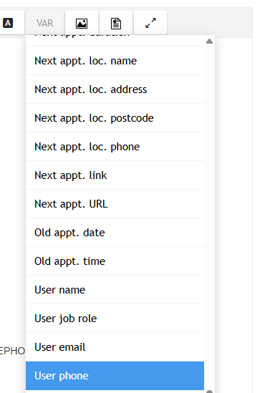
For appointments, this will use the mobile number of the user the appointment is booked with, giving group sites more flexibility where a shared practice number is not suitable.
Improved appointment search performance under Create → Appointment
Appointment searches performed under Create → Appointment now scan the selected date range in 30-day windows. Once matching appointments are found within a window, the search stops, helping return results more quickly.
Note: searches are limited to a maximum date range of 6 months, helping improve performance.
Clinician Appointment Costs Report Improvements
The 'Clinician Appointment Costs' report under Finance views has been enhanced with additional financial information and filtering options.
- A new 'Profit' column shows the difference between the appointment cost and the amount payable to the clinician, along with a Profit percentage column to help you quickly understand margins.
- A new 'Paid' column has been added, allowing you to see at a glance whether an appointment has been paid by the client.
- We've added an 'All' option to the Clinician filter, making it easier to run reports across all clinicians without selecting them individually.
AI Form Import Improvements
We’ve made a number of improvements to the AI Form Import tool to improve the accuracy and reliability of imported clinical forms, particularly for larger and more complex assessments.
These updates focus on preserving the original wording and structure of imported forms more accurately, while reducing the amount of manual correction needed after import.
Improvements include:
- Better preservation of original clinical wording from source documents
- Improved handling of mandatory fields to reduce false required-field indicators
- More accurate field type detection for common clinical form patterns
- Improved consistency across multi-page and longer forms, helping reduce missing content and formatting issues
- Better grouping and interpretation of related form fields and supporting text
- Improved handling of page formatting and layout elements to avoid creating unnecessary fields from document headers, footers or decorative content
We’ve also updated the underlying AI processing workflow and benchmarked multiple AI models against a range of clinical forms to improve overall import quality and consistency.
Please note: the AI Form Import tool is designed to significantly reduce the time needed to build forms, but imported forms will still require review and manual adjustments before use. As with any AI-generated content, we recommend checking imported fields, wording, formatting, and mandatory settings carefully to ensure everything has been interpreted correctly.
Microsoft 365 Reauthentication Notifications
We’ve improved how WriteUpp handles Microsoft 365 connection issues caused by expired or invalid authentication tokens.
If an email fails to send, or a calendar sync cannot complete due to an invalid token, you will now receive a notification in WriteUpp prompting you to reauthenticate your account connection. You can do this on the Microsoft 365 Integration page by disconnecting and signing in again.
AI Scribe Improvements
A new warning has been added to remind users that generated draft notes must be saved and finalised within the AI Scribe modal before saving the note in WriteUpp. If the draft is not finalised and inserted into the note first, it will be lost and cannot always be recovered.
Users should remain on the note page and avoid navigating away until they have confirmed that their AI-generated notes have been successfully inserted.
Improvements have also been made to the handling of long assessment recordings. Recordings will now either process successfully or fail with a clear error state.
If processing does fail, you can start a new AI Scribe recording directly from the same assessment form without needing to create a new assessment.
Online Booking 2.0 Accessibility & Usability Improvements
Accessibility and usability improvements have been made to Online Booking 2.0.
- Available appointment times are now automatically brought into view when a date is selected
- The email verification fallback option is clearer and remains available after requesting an SMS code
- A range of accessibility enhancements have been implemented to improve keyboard and screen-reader support.
Task Improvement
To help with task management, two changes have been made:
- The user who created a task has been added to the information displayed in the header of the page
- Main Menu → Tasks now contains a created by column to show the same
Notes access for responsible users
Privileged, Regular and Restricted users can now access Main Menu → Tools → Data Export → Notes to view all notes for the clients they are responsible for.
Note: This feature is only available on sites using the "Visible to responsible user" setting. Users who are not Site Administrators will only be able to view notes for clients they are assigned as responsible for.
Furthermore, to help protect sensitive information, non-site administrators can view notes but cannot export them.
Bug Fixes
- To improve reliability when importing forms, PDF uploads through the Form Import tool are now limited to a maximum file size of 8MB and up to 50 pages per document.
- If a page cannot be processed during a form import, it will now be skipped and the import will continue for the remaining pages. If this happens, you’ll receive a desktop notification letting you know that some pages of the form could not be imported.
- The Same Name Alert modal now supports scrolling when potential duplicate client records are identified.