
The WriteUpp Open API allows you to securely connect your WriteUpp site to trusted third-party applications, reporting tools, and integrations without needing to share a staff member’s login details.
The first version of the Open API is designed for secure, read-only access to data within your WriteUpp site.
API access is region specific.
For WriteUpp accounts using Europe/UK, API documentation can be found here.
For WriteUpp accounts using Canada/North America, API documentation can be found here.
About the Open API
The Open API is intended for server-side integrations that need to securely read information from your WriteUpp site.
This first version of the API is read-only. Integrations using the API can retrieve information, but cannot:
- Create records
- Update records
- Delete records
- Cancel appointments
- Archive data
- Process payments
The following areas are currently available through the API:
- Appointments
- Appointment types
- Appointment categories
- Appointment statuses
- Users
- Patients
- Invoices and invoice items
- Locations
- Expenses
- Payment types
- Referral sources
- Taxes / VAT rates
- API status and information
Additional areas and functionality may be added in future updates.
Accessing the Open API
Site Administrators can access the Open API settings by navigating to the Main Menu → Integrations & Add Ons → Open API → Configure: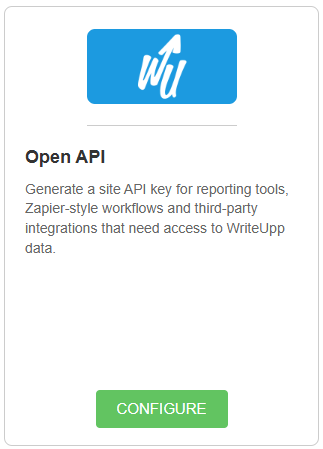
From here, you can generate and manage your site’s Open API key and view the regional API URL for your site.
The Open API is available to subscribed WriteUpp sites only. Trial sites will not see the Open API under Integrations & Add Ons, as API access is disabled during the trial period for security reasons.
Managing API Keys
The Open API uses API keys to securely authenticate external applications and integrations.
API keys are managed at site level, meaning only Site Administrators can create, regenerate, revoke or reinstate them.
Generating an API Key
To create a new API key:
- Navigate to the Open API configuration page under 'Integrations & Add Ons'
- Click Generate Key
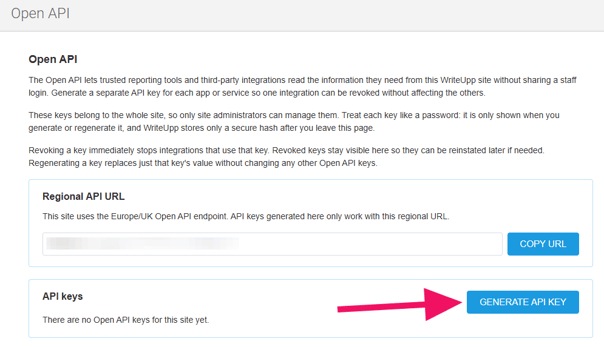
- Copy the generated key and store it somewhere secure
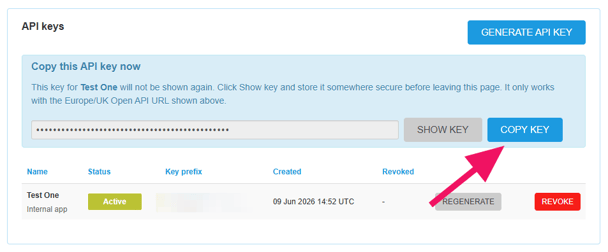
Important: The full API key is only shown once when it is generated or regenerated. Once you leave the page, WriteUpp stores only a secure hash of the key and it cannot be viewed again.
Treat API keys like passwords and only share them with trusted applications or services.
You can generate a separate API key for each app or service, so one integration can be revoked without affecting the others.
Revoking and Regenerating Keys
If an integration is no longer required, you can revoke its API key at any time using the Revoke button: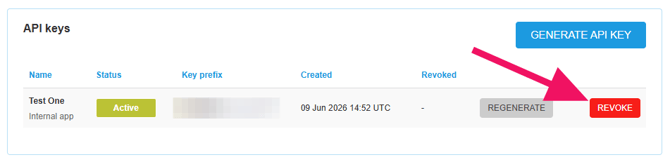
Revoking a key immediately prevents that integration from accessing your WriteUpp data. Revoked keys remain visible within the Open API page and can be reinstated later if required.
If you regenerate a key:
- A new key value is created - copy it and store it somewhere safe
- The previous key immediately stops working
- Existing integrations using the old key will lose access until updated with the new key
Regional API URLs
The Open API is regional.
Your API key will only work with the Public API URL shown on your WriteUpp Open API configuration page.
For example, keys generated for one regional environment cannot be used against another regional API endpoint.
Always ensure your integration is connecting to the correct API URL displayed within WriteUpp.
-
For WriteUpp accounts using Europe/UK, API documentation can be found here.
-
For WriteUpp accounts using Canada/North America, API documentation can be found here.
Security and Access Control
Because API access is managed at site level, administrators retain full control over which external systems can access site data.
Access can be removed instantly at any time by revoking or regenerating the API key.
For security reasons:
- Only trusted applications should be given API access
- API keys should never be shared publicly
- API keys should be stored securely by the external application or service
Need Help?
If you need assistance using the Open API, please contact the WriteUpp Support team at support@writeupp.com.