
We’ve seen just how important AI-powered tools are becoming in healthcare and clinical settings, especially when they’re fully integrated into practice management systems. So we’ve brought AI Scribe into WriteUpp. Read on to learn more.
We’ve also introduced pro-rata billing when updating your subscription (note: this change applies to subscriptions managed through Stripe Billing only). You’ll find more details about how this works further down.
Introducing AI Scribe in WriteUpp
We’re excited to introduce AI Scribe, a powerful new add-on designed to transform the way you create notes, assessments and documents in WriteUpp.
AI Scribe is an intelligent, AI-powered tool that captures conversations and turns them into structured and professional clinical documentation. Available at £23.95 per licence and only for users who wish to use it, AI Scribe integrates seamlessly into your WriteUpp site. Whether you’re writing up notes after a session or completing an assessment in real time, AI Scribe helps you work more efficiently while staying focused on your client.
Plus, every user gets a 4 hour free trial, giving you the chance to explore how it fits into your practice before committing to a subscription. If it isn’t for you, then you don’t have to use it!
A smarter way to document your sessions
With AI Scribe, you can move away from manual note taking and instead let your sessions speak for themselves. The feature listens to conversations and generates clear, structured content that can be reviewed, edited and saved directly into your client records.
It can be used across notes, assessments and documents, making it a flexible addition to your day-to-day workflow.
Designed to fit around how you work
AI Scribe supports two different ways of working when creating notes and documents.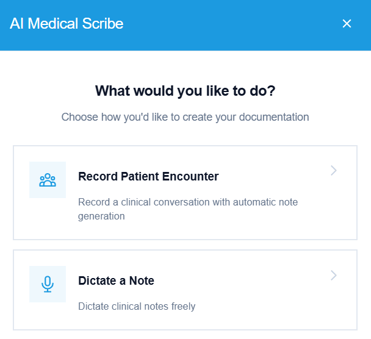
If you prefer to document after or outside of a session, Dictation allows you to simply speak your notes aloud. AI Scribe will transcribe and organise your words into text, ready for formatting and review.
For real-time documentation, Encounter mode can be used during a live session. It captures the full conversation, including multiple speakers, and generates a structured note once the recording is complete. You can choose from recognised clinical formats such as DAP, BIRP and SOAP, or opt for a brief progress note.
Support for assessments
AI Scribe can also be used within assessments, helping you complete them as you speak with your client.
As you ask questions and receive responses, AI Scribe listens and maps the conversation directly to the relevant fields in your assessment. Once the session ends, the form is automatically populated, massively reducing the time needed to complete it.
Alternatively, if you prefer to complete an assessment outside of the session (for example, when filling in a form for the clinician to complete), you can speak the questions aloud and then dictate the answers you would like recorded. AI Scribe will capture this information and populate the relevant fields accordingly.
Built to reduce admin and improve consistency
AI Scribe is designed to take the pressure off documentation by
- Reducing the time spent writing notes manually
- Supporting faster completion of assessments and documents
- Improving consistency across records
- Helping you stay focused during client interactions
By integrating AI Scribe into your workflow, you can spend less time on admin and more time delivering excellent care.
Getting started
AI Scribe is available as an add-on within your subscription. Once enabled, licences can be assigned to individual users who need access.
To add AI Scribe licences, your subscription needs to be set up with Stripe Billing. If you don’t see the AI Scribe licences option on the Account Details screen, you can click here to learn how to switch to Stripe Billing.
Don’t forget to make the most of your 4 hour free trial first! You can assign licences and free trials to users under Integrations & Add Ons → AI Scribe → Configure. 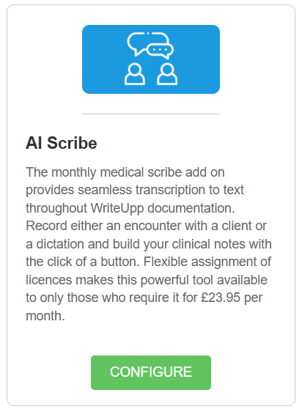
You must have the user role of Site Administrator to manage AI Scribe licences. If you have a different role, please contact your Site Administrator to assign you a licence or free trial.
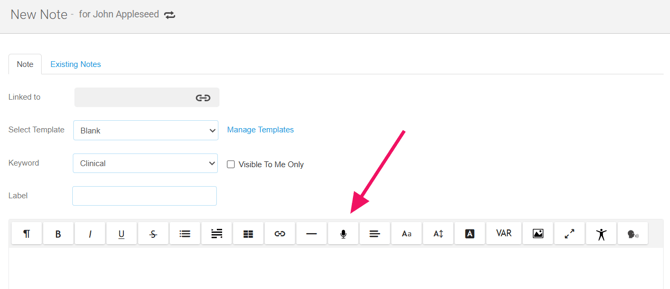
Once you have a licence or free trial assigned, to use AI Scribe, simply open a new note or document and launch the feature from within the editor. From there, you can choose how you want to capture your session, either through dictation or a live encounter.
For Assessments, you can open AI Scribe using the 'Open Scribe' button at the bottom of the screen.
You can read more about using AI Scribe via the link below, and feel free to drop us a message if you have any questions. We’d love to hear your feedback!
An important note
AI Scribe is able to capture all voices within a conversation and generates content based on what is said. While it can be a very helpful tool, it’s not guaranteed to be 100% accurate, so you should always review and check the output.
After recording, it may take a few minutes to process and produce the final output. Please wait for the note to be generated before leaving the screen.
As with any AI generated content, it’s important to review and edit the results before saving. AI Scribe is designed to support your workflow, not replace your clinical judgement.
Important Update on Billing
NEW: Billing with Prorated Charges (Stripe Billing Subscriptions ONLY)
We’re updating how subscription changes are billed to make things clearer and fairer.
IMPORTANT: These changes only apply if your subscription is managed through Stripe Billing. If you’re not using Stripe Billing yet, you can switch to unlock all available benefits. Click here to learn how.
What’s changing?
When you make changes to your subscription (such as adding or removing user licences, AI Scribe licences, or video licences), we now use prorated billing.
This means you’ll only ever pay for what you actually use.
If you add something, you pay a bit now. If you remove something, you get a bit back.
How it works
If you upgrade (increase your subscription):
If you add something that increases your subscription cost, you’ll be charged a little extra to cover the increased cost for the remaining time in your current billing period.
Example:
-
Your billing date is the 1st of each month
-
On the 15th, you add a licence costing £20/month
-
There are 15 days left in the billing cycle
You’ll be charged £10 upfront (for the remaining half of the month).
From your next billing date, the full £20 will be included in your regular subscription.
If you downgrade (reduce your subscription):
If you remove something, you’ll get a credit for the unused time.
Example:
-
Your billing date is the 1st of each month
-
On the 15th, you remove a £20/month licence
-
There are 15 days left in the billing cycle
You will pay less in your next billing for the downgraded subscription.
You’ll also receive a £10 credit for the unused time. This will be automatically applied to your next invoice.
Note: The above examples are to help illustrate how this works and don't represent exact WriteUpp pricing.
Why we’re doing this
-
You only pay for what you use
-
You’re not overcharged when making changes in the middle of the month
-
We’re covered for the service we’re providing
-
You can upgrade or downgrade at any time with confidence
We know billing changes can sometimes feel a little confusing, but please don’t worry, you’ll never pay more than what you owe. Any upfront cost simply covers the service you’ve added for the remaining time in your current billing cycle. After that, your subscription will continue at the new amount as normal.
It works both ways too! If you reduce your subscription, we’ll automatically credit you for any unused time left in the billing cycle, and this will be applied to your next invoice.
If you’re unsure about anything or would like us to walk you through it, we’re always happy to help, just get in touch 😊