
This release introduces one of the biggest additions to WriteUpp yet, with powerful new Group Bookings and Block Bookings functionality designed to make managing sessions with multiple clients simpler than ever.
Alongside these major new features, we've expanded AI Scribe to support video consultations, introduced a range of workflow improvements, enhanced reliability across several areas of the platform, and delivered a number of bug fixes to make your day-to-day experience even smoother.
New Features
New: Group Bookings Have Arrived
We're excited to introduce Group Bookings to WriteUpp, making it easier than ever to organise, manage and deliver appointments attended by multiple clients.
Whether you're running a one-off workshop, a weekly exercise class, a therapy group or a structured treatment programme, Group Bookings provides everything you need to manage the entire journey from a single place.
Flexible group scheduling
Create group appointments in your calendar to suit the way you work:
-
One-off group bookings for individual classes or sessions.
-
Recurring group bookings for regular sessions that repeat over time.
Once created, you can easily add and manage attendees, update attendance and appointment statuses, create invoices, record payments and write shared clinical notes, all while keeping each client's own appointment record up to date.
Easily manage your attendees
Add and remove attendees, update attendance and appointment statuses, and manage each participant individually while keeping everything connected to the same group booking.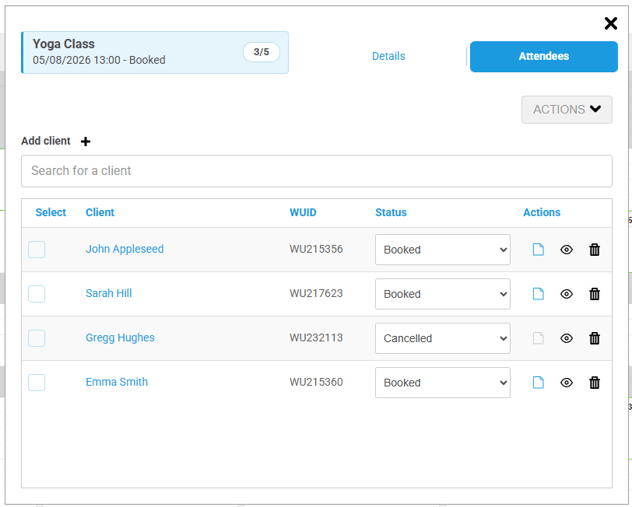
Individual invoicing and payments
Although clients attend the same group session, each attendee maintains their own appointment record. Create individual invoices, record payments and manage billing independently for every participant.
Shared clinical notes
Record a single group note and apply it to multiple attendees, saving time while ensuring each client's record remains complete.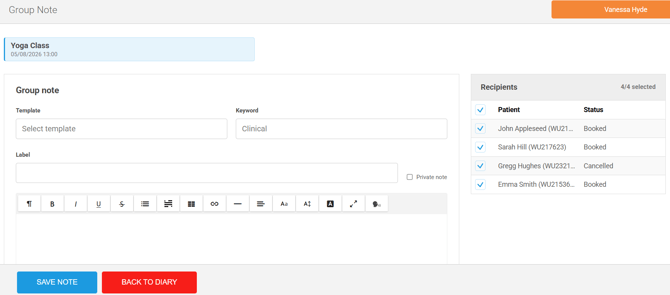
Block Bookings for Linked Group Sessions
For organisations running courses, programmes or multi-session treatments, Block Bookings provide a simple way to manage a series of linked group sessions.
Create one-off or recurring blocks, add attendees to every session in the block in a single action, and invoice the entire block for the client with just one click. Clients remain linked to each session within the block, making it easy to manage attendance, payments and clinical records throughout the course.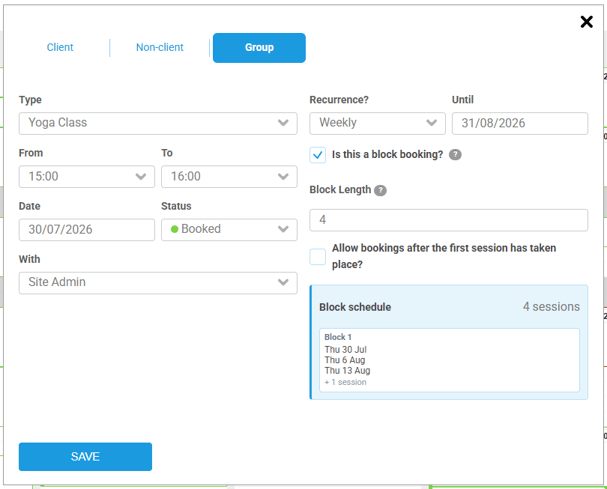
Enhanced communications
We've introduced new communication options designed specifically for Block Bookings. Clients booking onto a block can receive a single confirmation containing details of every session within their programme, helping them keep track of their appointments from the moment they book.
Online Booking and Client Portal support
Eligible group sessions and block bookings become available in Online Booking, allowing clients to book themselves onto a single session or enrol in an entire course in just a few clicks.
Once booked, clients can view and manage their group and block bookings through the Client Portal, where enabled, giving them greater flexibility while helping to reduce administrative workload.
NOTE: Group bookings are not supported in Classic Online Booking.
Group Bookings has been designed to fit seamlessly into your existing WriteUpp workflow, helping you spend less time on administration and more time delivering care. We can't wait for you to discover it!
Group Bookings Knowledege Base
AI Scribe for Video Consultations
AI Scribe is now available during video consultations, making it even easier to create clinical documentation without interrupting your workflow. Start recording at any point during a consultation and choose whether AI Scribe should generate a clinical note using your preferred template or populate one of your assessment forms from the consultation transcript.
For an even smoother experience, you can enable automatic transcription in My Settings, so recording begins whenever you start a video consultation.
Once processing has finished, you'll receive a desktop notification letting you know your documentation is ready, with a direct link to open your newly created note or assessment for review and editing.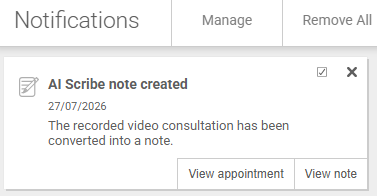
If you forget to choose whether you'd like to create a note or assessment before the consultation ends, don't worry. Your transcript will be retained for up to 30 days, allowing you to select an output and generate your documentation later.
Please note:
- For the fastest processing, end your consultation using the End Call button and confirm the appointment has finished.
- AI-generated content can take a little time to process after the consultation ends, so please allow sufficient time before contacting Support.
- AI Scribe is designed and tested primarily for one-to-one consultations; while group video consultations are supported, transcription accuracy and AI-generated content may be less reliable when multiple people are speaking.
- As with all AI-generated documentation, content should always be reviewed before being added to a patient's clinical record.
Learn more about using AI Scribe in video consultations.
If you notice any unexpected issues with video consultation, please clear the cache on your device. The browser cache still remembering old code can sometimes have an impact after an update.
User Groups for Responsible Users
Managing responsible users is now much easier for larger teams. You can now create User Groups in Settings → Users → User Groups (for example, by school, department or location) and assign an entire group as responsible for a client instead of selecting each user individually.
All members of the selected group are treated as responsible users, and any changes to group membership are reflected automatically, making it much easier to keep responsible user assignments up to date.
Learn more about managing and assigning User Groups.
Improvements
Timetable now available to all user roles
Timetable access has been extended to all users roles. Site Administrators retain access to manage the timetable for all users on their account. All other user roles can now access the Timetable from the main menu to view and edit only their own timetable.
Decimal place support for outcome measures
To enhance the output of the new Outcome Measures functionality, support has been added for decimal places in numeric field entry and calculations such as the average of a selection of fields.
When adding a Numeric field to a form template, you can now choose between whole numbers and decimals (2 places). If you expect either a number to 2 decimal places to be entered, or a calculation (like an average) to result in 2 decimal places, please use the new decimals option.
For any measures already built, the numeric field in the form template can be edited and changed to decimals. This will ensure any newly created forms for clients will use the new format. Existing patient forms will not be updated as a result of changing this.
Improved AI Scribe recovery
We've improved the reliability of AI Scribe when populating notes, documents and assessments.
If the browser is closed, the user navigates away, or an unexpected error occurs after the audio has been uploaded, WriteUpp will now attempt to recover the AI-generated content automatically. You will be notified when recovery is in progress and when the note, document or assessment has been successfully updated or created.
If automatic recovery is unsuccessful, you will receive clear feedback via a desktop notification and can retry the process.
Important: This recovery process is designed as a safeguard if something unexpected happens. We still recommend waiting until the AI-generated content has been fully created and finalised within your note, document or assessment before navigating away from the page or closing your browser. While WriteUpp will attempt to recover interrupted AI Scribe sessions where possible, recovery cannot be guaranteed in every circumstance.
Improved postcode matching in Client Portal
We've improved postcode matching when logging in to the Client Portal. Clients can now enter their postcode with or without a space in the middle, regardless of how it is entered in their record, reducing failed logins caused by formatting differences.
Calendar terminology update
We've updated the wording throughout WriteUpp to use "calendar" instead of "diary". This change makes terminology more familiar and consistent for users across all regions, particularly in North America, while keeping the experience the same.
Responsible user now selected by default
The ‘Responsible’ filter on the Clients -> By Responsible User page now defaults to the logged-in user, making it quicker to view your own patients. This applies to both Visible to all users and Visible to responsible users only visibility settings. The No Responsible option remains at the top of the filter list for easy access.
Phonetic symbol tool added to note and document templates
The phonetic symbol tool has been added to the toolbar when creating both note and document templates.
Custom field length increase
The length of a custom field on the client summary has been increased to 500 characters to allow more information to be saved in each one.
App Updates
To support this latest release, new versions of the WriteUpp App and the WriteUpp Pay App will shortly be available for both Apple and Android devices.
WriteUpp App - v3.8.0
WriteUpp Pay - v1.9.0
If you use either app, please ensure you download the updates once they land!
Bug Fixes
- Corrected the currency symbol displayed in the Override Cost setting when creating/editing an Appointment Type to match the site's configured currency.
- Added a splash screen to the WriteUpp Pay app to improve the app launch experience.
- Fixed the Appointments by Clinician report to correctly contain all appointments within the specified date range.
- Updated the Data Hygiene Tool to correctly account for more recently uploaded documents and attachments. These were previously not updating the “Last Intervention” date.
- Changes made to the M365 calendar sync to address intermittent issues with some appointments not syncing to the external calendar.