
In this release, we’ve introduced the new Solo + Scribe plan, added the option for Stripe Unified users to block American Express payments, and made a number of improvements across the WriteUpp App, Client Portal, Open API, assessments and payment handling.
There are also several smaller fixes and usability improvements to help keep things running smoothly.
New Features
New Solo + Scribe plan and an improved Change Plan experience
For users paying for their subscription via Stripe billing, we've introduced a new Solo + Scribe subscription plan, combining everything included in our Solo plan, plus AI Scribe for the clinician. You can read all about the different plans available in WriteUpp here.
Want to make the switch to Stripe billing for your subscription? Read our guide here to learn more.
We've also given the Change Plan experience a fresh new design for Stripe billed subscriptions. When switching between plans, you'll now choose your new plan first, followed by any add-ons you'd like to include.
This makes it easier to see what's included in your chosen plan and customise your WriteUpp subscription with the additional features you need.
Note: If you simply want to make changes to your current plan, rather than switch between Flex, Solo or Group plans, you must still do this directly from the Account Details page. Update the relevant Users, Video Licences or AI Scribe Licences fields, then select 'Update Subscription' to apply your changes.
Option to block American Express payments
Due to higher network costs associated with American Express and to give you more control over the fees you incur, Stripe Unified users can now choose not to accept American Express payments. A new ‘Do not accept American Express payments’ setting is available under Integrations & Add Ons → Stripe → Configure.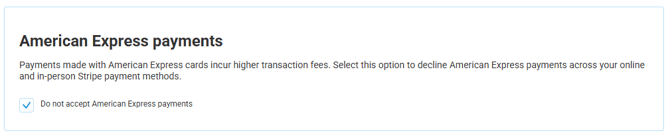
When enabled, attempts to pay using an American Express card will be rejected and an error message will appear informing the client that the merchant does not accept American Express cards. The client will then need to use a different card to complete the payment.
This applies across supported payment methods, including online invoice payments, Online Booking, Stripe Terminal and WriteUpp Pay.
If you choose not to accept American Express, we recommend making your clients aware before they attempt to pay. For in-person payments, let clients know before taking payment to avoid issues at the till. You may also want to add a note to your invoice footer or client emails explaining that American Express is not accepted, so clients can have an alternative payment card ready.
Improvements
Improved AI Scribe recovery
We've improved the reliability of AI Scribe to prevent Notes, Documents and Assessments from becoming stuck if processing is interrupted.
AI Scribe can now automatically recover eligible interrupted sessions and continue processing in the background, helping ensure your generated content is completed rather than remaining indefinitely pending.
Please note: When using AI Scribe, you should remain on the page until you have selected Save and Finalise in the modal and the generated content has been applied, and the note has been saved. If you choose to navigate away without saving and finalising the Scribe content and saving the note, your generated content will be lost and will not be automatically recovered. This ensures AI Scribe doesn't save clinical content that you haven't chosen to keep.
Clearer guidance when using AI Scribe
We’ve added some helpful guidance when you first use AI Scribe from a note and assessment, including a reminder to keep the page open until your audio has finished uploading. This helps ensure your recording is uploaded successfully and ready for AI Scribe to process.
For the best experience, we recommend keeping the page open until your recording is uploaded and AI Scribe has finished processing and generating your content.
Improved AI Scribe reliability in Video
We've improved AI Scribe functionality in video to better handle delays from Zoom. It will now wait longer for transcripts and automatically resume processing if a delayed transcript becomes available, helping ensure your Scribe content is generated successfully.
Custom fields now support multiple lines
Custom fields on the Patient Summary can now include line breaks without incorrectly triggering the 500 character limit, making it easier to enter and format longer information across multiple lines.
Open API - Patient Custom Fields
Patient custom fields are now available through the Open API. Patient responses include active custom fields from the Patient Summary, including the field name and saved value, making it easier to use custom patient information in external integrations and automated workflows.
Client Portal Improvement
We've improved the look of the Client Portal by centering the message when there are no appointments to display and hiding the Groups section when the client has no group bookings.
Locked assessments now display numeric field labels and scores correctly
We’ve updated locked assessments in both Desktop and the app so that single choice numeric fields now display both the score and its corresponding label, matching the information shown on the original assessment.
Improved Attachment Handling in the WriteUpp App
We’ve improved attachment handling in the app on Android, particularly on newer devices, including photo uploads, camera images and downloaded documents. Failed uploads will now also show an error so they can be retried.
WriteUpp App - File Size Limit Increased
We’ve increased the maximum file size limit from 4mb to 8mb for attachments uploaded via the WriteUpp App.
Improved payment allocation in the WriteUpp Pay app
We've improved payment handling in the WriteUpp Pay app where an invoice is created for an appointment after the appointment has already been loaded in the app.
When taking payment, WriteUpp will now check for a newly created outstanding invoice and ensure the payment is correctly allocated to it, rather than leaving the invoice unpaid or the payment unallocated.
To make sure you have the latest fixes and improvements, please check the App Store or Google Play Store and update the WriteUpp and WriteUpp Pay apps to the latest available versions.
Bug Fixes
- Fixed an issue where changing pages in the Client by Responsible User list could reset the selected Responsible user filter.
- We've fixed the visibility of options under Settings & Tools, so users will now only see menu items that are relevant to their role and permissions.
- Fixed an issue where the shadow of the live chat widget could appear on PDFs printed from WriteUpp.