
This release brings an exciting new integration along with a range of improvements designed to make day-to-day tasks smoother, clearer, and more flexible. From keeping your diary and emails connected with Microsoft 365, to better session tracking, clearer Online Booking descriptions, and more control over exports and payments, these updates focus on helping you stay organised and in control.
New Features
Microsoft 365 Integration
You can now connect Microsoft 365 to WriteUpp, making it easier to keep your diary and emails in sync.
Microsoft 365 Calendar sync (per user)
Each user can connect their own Microsoft 365 calendar to their WriteUpp diary. Once connected, appointments booked in WriteUpp will automatically sync to Microsoft 365 with a one-way sync from WriteUpp to Microsoft 365.
The following details are sent to your Microsoft 365 calendar:
- Appointment type
- Date and time
- Appointment status
- Client name
- Client contact details
- Location name
If the date/time of an appointment or the status is updated in the WriteUpp diary, those changes will also sync to Microsoft.
Each user can connect a different Microsoft 365 calendar account if needed.
Microsoft 365 Email connection (site setting)
Site Administrators can also connect a Microsoft 365 Outlook email account to WriteUpp. When connected and with the Microsoft 365 mailbox selected, all emails sent from within WriteUpp will be delivered from your Outlook email account instead.
This is a site-wide setting and applies to all users once enabled.
For more information on the new Microsoft 365 integration and how to use it, check out the articles below:
- Microsoft 365 Email and Calendar Integration in WriteUpp - Site Administrators
-
Microsoft 365 Calendar Integration in WriteUpp - Privileged, Regular and Restricted Users
Improvements
Approved Sessions tracking
We’ve added a new field to help track how many sessions have been approved for an episode, along with a few related improvements.
- A new field called 'Number of approved sessions' has been added when editing an episode, below 'Starting session number':
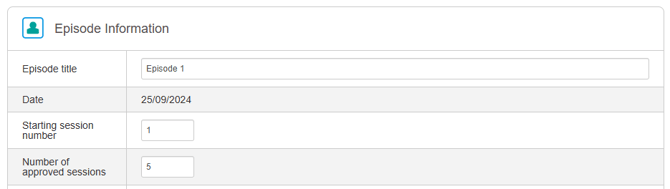
- When populated, the approved sessions value is shown in the appointment modal next to the session number, making it easy to see how many sessions have been used versus how many were approved.
- A new alert will then appear when saving an appointment where the session number is greater than the approved sessions value:
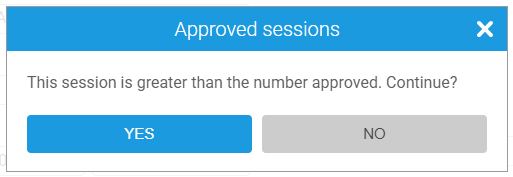
Also, the Description field on the episode has been updated to a paragraph-style text field, making it easier to add notes!
Improved Formatting for Description Fields in Online Booking
You can now use line breaks and paragraphs in description fields for Online Booking 2.0, making it easier to structure and present information clearly.
Any formatting you add in WriteUpp will now be preserved and displayed correctly on your Online Booking site for:
- Appointment type descriptions
- User profile descriptions
- Location descriptions
This makes it easier to organise details and present information clearly to clients when booking online.
Default sales account for contacts - Xero exports
You can now assign a default Xero sales account to individual contacts in WriteUpp. This means that when invoices are exported to Xero, the correct sales account can be applied automatically based on who the invoice is payable by (Patient, Next of Kin, or Third Party).
A new optional ‘Xero sales account’ dropdown has been added below the Xero contact link: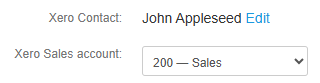
If an account is selected, it will override the default account set under Integrations & Add ons → Xero when exporting invoices. If no contact-specific account is chosen, the system will continue to use your existing default mapping.
The selected account is also shown in the export modal, where it can be reviewed and changed before sending the invoice to Xero.
Rename Stripe readers from the integration screen
You can now edit the name of a reader directly from the Stripe integration screen in WriteUpp. In the Stripe reader table, click the pencil icon next to a reader name, enter the new name, and save your changes: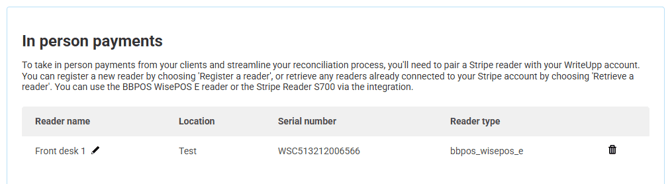
For larger readers (S700 or WisePOS), the updated name will also be synced to your Stripe account.
This makes it easier to distinguish between multiple readers if you have more than one set up.
Default start page for all user roles
All users can now choose their own default start page when logging into WriteUpp. Under My Settings, site admins, privileged, regular, and restricted users can now select whether they land on the Diary or the Dashboard as their homepage.
Bug Fixes
- Appointment durations can once again be edited by dragging the bottom of the slot up or down.
- Both subscription and standard SMS credits are now included in the low credit warning limit on the Account Details page.
- Regarding clinician override costs, the Appointment Type modal in Online Booking 2.0 now shows the correct pricing.
- Receipts for Stripe payments made through the online payments portal are being sent again.
- To help reduce activity feed timeout issues, the activity feed is now limited to displaying entries from the past two years only.