
With the Heidi integration enabled, Heidi can be used directly within assessment forms in WriteUpp, allowing you to capture your consultation, generate responses for your form, and push the content straight into the assessment without leaving your WriteUpp site.
Before you begin
Before using Heidi in an assessment, please make sure Heidi has already been enabled for your site and that you have signed in through the Heidi Widget.
If not, please refer to this guide on enabling Heidi first.
How to use Heidi in an Assessment
- Select the correct Active Client in WriteUpp.
- Go to Create → Assessment and choose the assessment form you would like to use.
- In the assessment screen, click the Heidi icon to open the widget
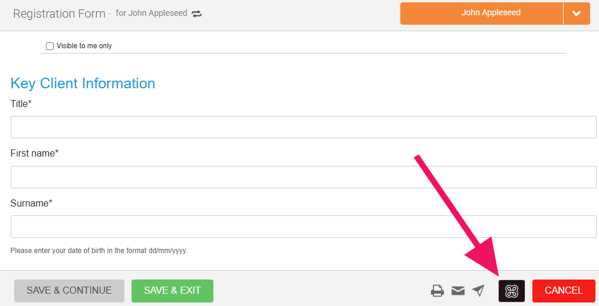
Note: At the top of the widget, check that the correct microphone is selected. - Click Start Visit within the widget
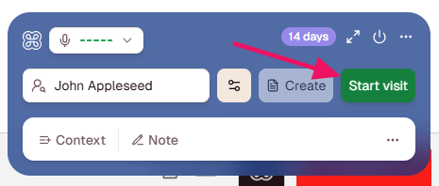
- Carry out your consultation as normal while Heidi records in the background.
- When the session is complete, click End Session within the widget. You can also pause recording at any time, if needed
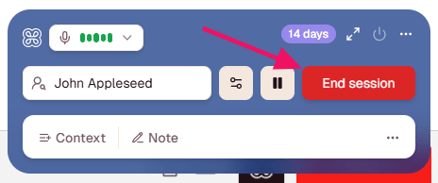
- Heidi will generate the assessment form template and the content in the widget.
Note: This may take a few minutes, so please do not close the widget or leave the page. - Maximise the widget if necessary, then review and edit the generated form content as needed. You can also view the generated note and transcript within the widget
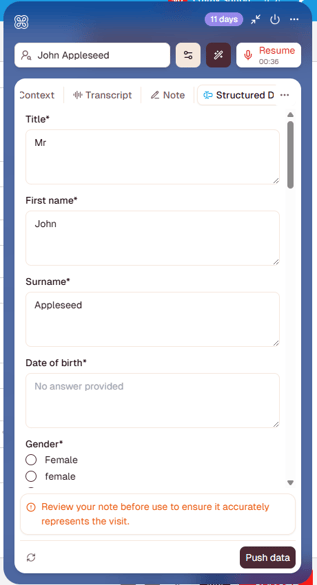
- Once you are happy with the content, click Push data to insert it into the assessment form in WriteUpp.
- Make any final edits, then save the assessment as normal.
Afterwards, the consultation will also appear in your Heidi account, where you can view the generated note and transcript.
Important
We’d always recommend reviewing any AI-generated content before saving, to ensure it accurately reflects your consultation and meets your clinical documentation standards.
If you experience any issues within the Heidi Widget itself, such as signing in, session recording, generated outputs, or widget functionality, please contact Heidi Customer Support directly for assistance. The Heidi Widget is managed by Heidi rather than WriteUpp, and we’re sorry, but we’re unable to help with issues outside of WriteUpp.