
What’s new in WriteUpp
This release brings some exciting new ways to customise and manage your WriteUpp experience.
You can now personalise the tabs on your Client Record, block individual patients from making Online Bookings, and sync events from Microsoft 365 directly into your WriteUpp diary.
We’ve also made two-factor authentication easier, introduced a new 'In Progress' status for Tasks, improved Video Scribe and WriteUpp Pay reliability, and made a range of improvements across Online Booking, the Client Portal and Open API.
Read on to discover everything that’s new and improved.
New Features
Personalise your Client Record tabs
You can now customise the tabs shown on the Client Record, making it easier to find the information you use most often!
Note: You must have the role of Site Administrator to customise the Patient Summary.
In the new 'Customise' section under Settings, Site Administrators can:
- Drag and drop tabs into their preferred order.
Note: The Patient tab will always remain visible and appear first. - Use the Visible checkbox to show the tabs they need and hide those they don’t.
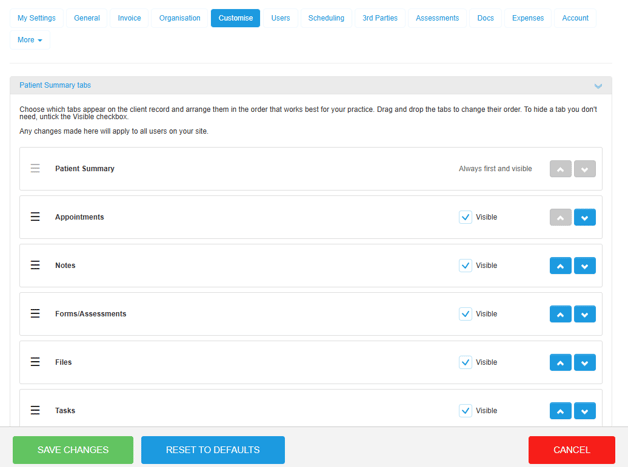
Please note that any changes you make here will apply to all users on the site.

Learn more about customising the Client Record tabs here.
Block Patients from making Online Bookings
You can now prevent a patient from booking appointments by selecting ‘Block from booking’ under Alerts when editing their patient profile.
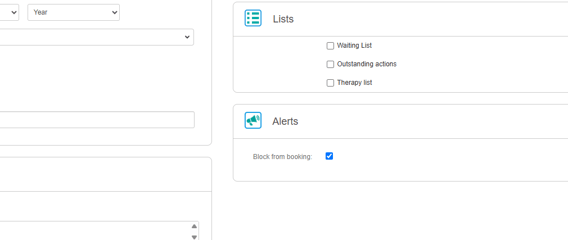
When a patient is blocked:
- They’ll be unable to make appointments through Online Booking if they try using details linked to their existing record.
- They’ll see a discreet, generic message explaining that online booking is unavailable.
- The 'Book an appointment' option will be hidden when they sign in to the Client Portal.
Within WriteUpp:
- WriteUpp will display a warning if a team member tries to book them an appointment through Desktop or the WriteUpp App. The warning can be overridden if the booking should still go ahead.
- The same warning will appear when adding them to a group or block booking.
The setting is switched off by default and can be removed from the patient’s profile at any time.
Please note that WriteUpp identifies blocked patients using the personal and contact details they enter. Although this provides an additional safeguard, it may not prevent a determined person from booking with completely different details.
Learn more about using the new 'Block from booking' setting here.
Sync Microsoft 365 events to your WriteUpp diary
You can now choose to bring events from your connected Microsoft 365 calendar across into your WriteUpp diary.
Synced events from Microsoft 365 appear as read-only, unavailable time slots in your diary and prevent appointments from being booked during that period across WriteUpp and Online Booking. The Event titles are shown alongside a message showing they were synced from Microsoft 365:
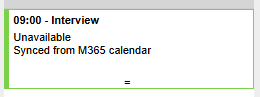
Any changes to events or deletions made in Microsoft 365 will automatically update the slots in your WriteUpp diary.
Important: As Microsoft 365 remains the source of the event, synced events must be managed there.
You can enable this under your Microsoft 365 calendar integration settings using the new ‘Import calendar events’ switch, where you can also check the sync status, see when it last completed successfully and reconnect, if required.
Disabling the switch removes the imported diary blocks without affecting the original Microsoft 365 events.
Learn more about importing Microsoft 365 calendar events here.
Improvements
Two-factor authentication codes now sent by email
We’ve made it easier to complete two-factor authentication (TFA) when signing in to WriteUpp.
If your email address is verified, your TFA code will now be automatically sent to you by email when you sign in. You can enter this code on the TFA screen as normal.
If you prefer to use an authenticator app, you can continue to do so, as your authenticator app code will still work.
Site administrators can now also choose whether SMS is available as a TFA option for their site. When enabled, users with a verified mobile number can still choose to have their code sent by text message, provided the site has sufficient SMS credits.
If you haven’t already set up two-factor authentication, we strongly recommend doing so, and with codes now sent automatically to your verified email address, it’s easier than ever to use.
Heads up! If you’re setting up 2FA for the first time, you’ll still need to use an authenticator app to complete the setup.
Once 2FA is set up, if your email address is verified, your login codes will then be sent automatically to your verified email address.
New ‘In Progress’ status for Tasks
We've added a new ‘In Progress’ option to Tasks, making it easier to keep track of work you've started but haven't yet completed.
You can mark a task as 'In Progress' from the Active Tasks list or when viewing an active task. Once marked, the task will move to a new ‘In Progress’ tab under Tasks.
Clearer communication options when booking appointments
We’ve improved the ‘Edit communication details’ window when creating a new appointment in WriteUpp, making it easier to see which messages will be sent.
The preview will now show only the confirmations and reminders that apply to the appointment you’re creating, including the correct messages for standard, video and recurring appointments.
We’ve also improved the following options:
- Skip confirmations - prevents the initial appointment confirmation from being sent, while any scheduled reminders will still be sent.
- Only send confirmations - sends the initial confirmation but prevents any later reminders from being sent.
Improved reliability for Video Scribe
We’ve improved Video Scribe to make it more resilient if expected updates from Zoom or Scribe are delayed or missed.
If a Zoom transcript notification isn’t received, Video Scribe can now recover the completed transcript directly from Zoom and continue processing as normal. We’ve also improved how completed Video Scribe notes are finalised with Scribe, including automatic retries where needed.
These changes reduce the chance of Video Scribe requests failing or becoming stuck when the required transcript or note has already been successfully created.
More reliable payment confirmation in WriteUpp Pay
We’ve improved how WriteUpp Pay confirms payments. Previously, a payment could appear as completed in the app before Stripe had fully confirmed it, meaning a later decline or cancellation could conflict with the success message shown.
WriteUpp Pay will now wait for full confirmation before displaying a success message and marking the invoice as paid in WriteUpp. If the payment is cancelled, declined or times out, an error message will be shown instead.
Improved appointment statuses in the Client Portal
We've improved how appointment statuses are handled in the Client Portal to make sure clients see the correct information about appointments they're no longer attending.
If an appointment has any status that indicates the client is not attending, the relevant status will now be shown in the Client Portal and the appointment can no longer be changed or cancelled by the client.
Your selected cancellation status will continue to display as “Cancelled”, while other non-attending statuses will display their own status name.
Appointments where the client is still attending will continue to follow your existing Client Portal settings for changes and cancellations.
Improved existing client matching in Online Booking
We’ve improved how Online Booking identifies existing clients after they verify their mobile number or email address.
Mobile numbers can now be matched reliably when they have been saved in different formats, including with spaces, dashes, country codes or leading zeros. Email matching has also been improved.
This ensures existing clients are taken to the correct confirmation or selection screen instead of being asked to enter their details again, helping to prevent duplicate client records.
OpenAPI Improvements
-
We’ve updated the OpenAPI to allow integrations to access historical and deactivated clinicians when requested.
-
We’ve added a new line total field to invoice items in the Open API, showing the final value after discounts and tax.
-
Added more flexible filtering and sorting options to Open API list endpoints, making it easier for integrations to retrieve and organise the data they need efficiently.
-
We’ve expanded the Open API to allow authorised integrations to create notes against a patient record in WriteUpp. This can be used by integrations to securely add information such as laboratory testing and radiography results as text notes.
Access is controlled through dedicated API permissions to ensure existing read-only integrations cannot create notes.
Bug Fixes
- We've made small improvements to the AI Scribe licence screen, making paging easier to spot and updated the wording around adding more licences to your subscription.
- We've fixed an issue where AI Scribe content would be added to the end of a Note or Document instead of where you'd placed your cursor. After clicking ‘Save and Finalise’, your generated text will now be inserted at the cursor position you selected before starting the recording.
- Fixed an issue where 'Forgotten your password' could fail to send a reset email when active and deactivated users shared the same email address. Password resets will now correctly use the active account.
- Added paging to Future Appointments and Past Appointments in the Client Portal, making it possible to browse when you have lots of appointments.
- We've fixed an issue where provisional Online Booking appointments could appear in the Client Portal before the booking had been completed, allowing patients to cancel them. Provisional appointments are now hidden from the Client Portal and cannot be viewed, changed or cancelled.
- Fixed an issue where patient imports could fail if the Responsible User being imported was the same user carrying out the import and 'Auto Assign Responsible User' was enabled.
- The Site URL field on the login screen of the WriteUpp app is now clearer. Simply enter the first part of your WriteUpp site address and select either .writeupp.com or .writeupp.app (Canada and US only).
-
We’ve made validation messages clearer when completing Outcome Measure assessment forms. If a score is outside the allowed range, the error message will now show the range in a simple, easy-to-read format.