
If you want to subscribe straightaway (without completing the free 30 day trial), you will still first need to complete the sign-up process to set up your WriteUpp site.
Simply follow these steps:
1. Go to our sign up page and complete the trial sign-up process
2. Once you have followed the steps to set your password and practice information, and been logged into your new account, click on the menu at the top left of the screen and click on Subscribe Now. This will take you to the subscription screen.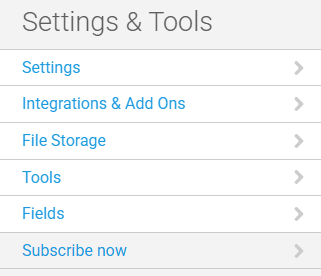
3. Select an available plan:
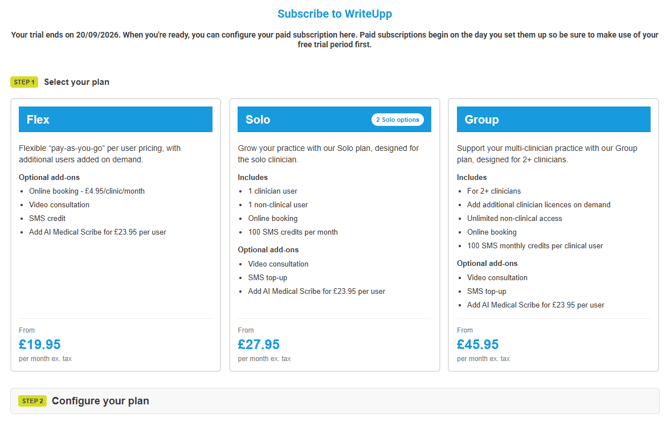
Read more about the available subscription plans here.
4. Next, configure your plan:
-
Specify how many user licences you require (Flex and Group only).
Note: On Flex, all users require a paid licence, including non-clinical users. On Group, only clinical users need a licence - non-clinical users are free and unlimited. -
Add the number of group video licences required.
Note: 1:1 video calling is included in your WriteUpp subscription (video minute bundles must be purchased to host calls). To host group video calls, users must have a video licence assigned. Users with a video licence also receive unlimited video minutes, which can save you money if you regularly use video services (read more). -
Add the number of AI Scribe licences required.
Note: Solo + Scribe includes one AI Scribe licence as standard, so you only need to add any additional licences required.
AI Scribe is a powerful AI add-on that turns speech and conversations into structured, professional notes, assessments and documents, helping you save time and reduce admin. Learn more. -
If you're choosing the Flex plan, toggle the Online Booking switch on if you wish to use this (Solo, Solo + Scribe and Group plans include Online Booking as standard).
7. Click ‘Subscribe now’ once you are happy with your chosen plan.
8. Complete the Direct Debit or enter card details for payment, and you're all set up!