
With this release, we're introducing an exciting new Outcome Measures feature, to help you capture, monitor and report on standardised clinical scores directly within WriteUpp. Whether you're tracking tools such as GAD-7, PHQ-9 or your own custom measures, Outcome Measures make it easier to record clinical outcomes consistently and review progress over time.
We've also made improvements to existing reports and applied a number of fixes and usability enhancements across Client Portal, invoicing and more.
New Features
Outcome Measures
We've introduced a new Outcome Measures feature to help you record, monitor and report on standardised clinical scores, such as GAD-7 and PHQ-9, directly within WriteUpp.
Fields for Outcome Measures can be created and then organised into groups, making it easy to manage different types of measures across your service.
Managing Groups and Fields for Outcome Measures
Once configured, Outcome Measures can be linked to numeric fields when creating and editing assessment forms in the Form Builder.
How to Build an Assessment with Outcome Measures
Scores are then calculated automatically as the assessment is completed, removing the need for manual calculations and ensuring consistent recording of clinical outcomes. Assessments can be completed by clinicians or sent to clients as Smart Forms, with Outcome Measure values recorded automatically when submitted.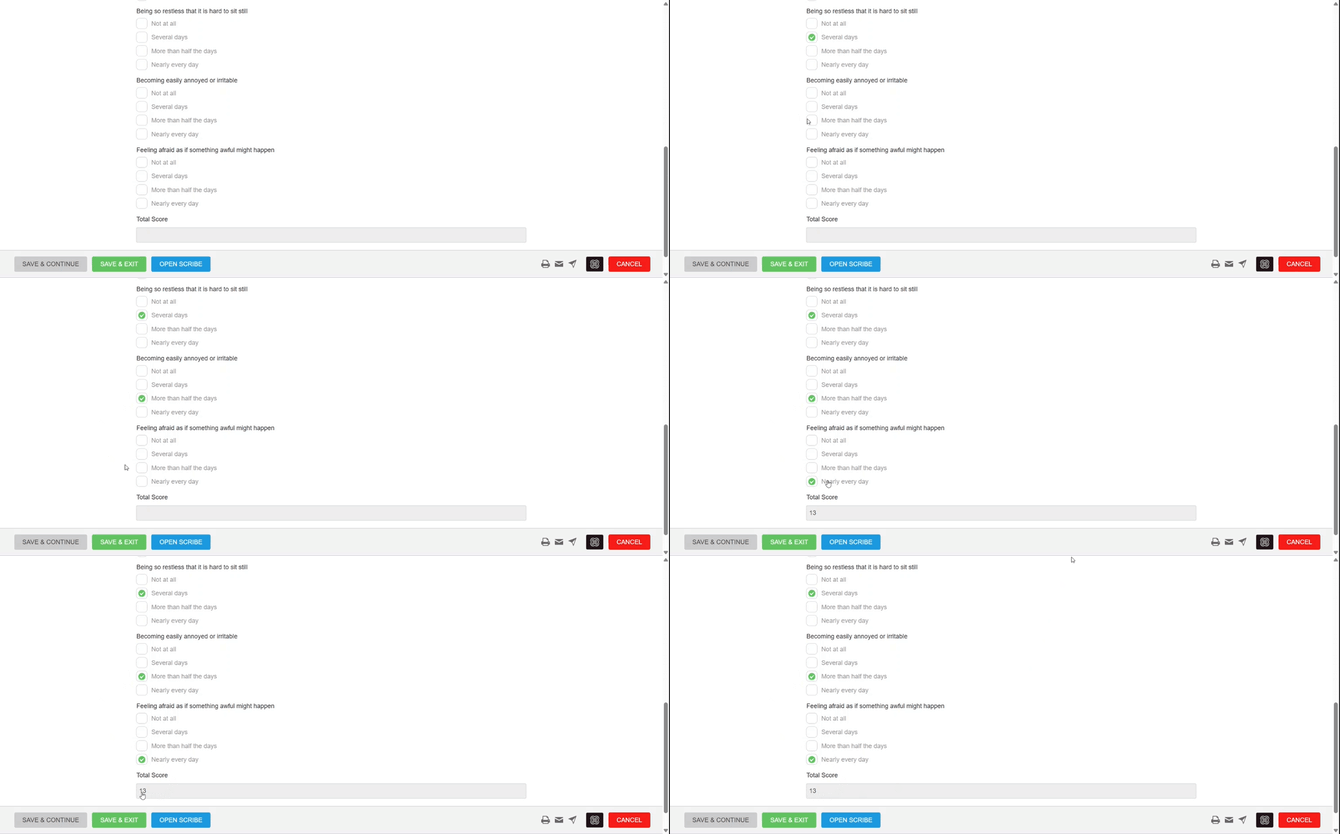
Recording Outcome Measures in an Assessment
Recorded Outcome Measures can then be viewed from the patient's record in both chart and table formats, allowing you to track progress over time. Historical values can also be added manually where required, such as when backfilling data from paper records or another clinical system.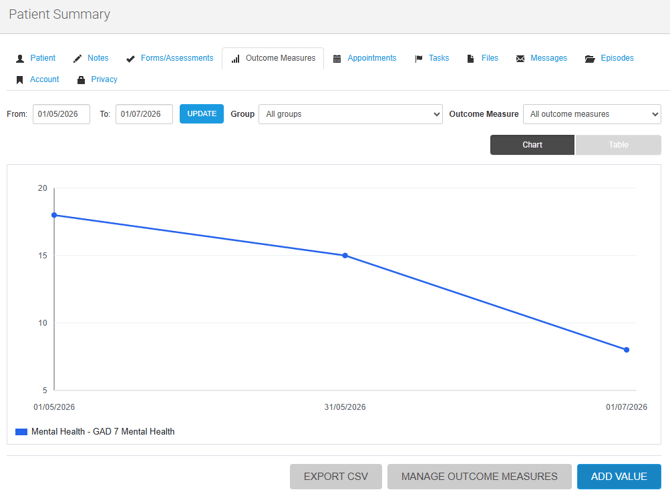
View and Manage Patient Outcome Measures
To help monitor clinical effectiveness across your organisation, we've also added a new Performance report. The Outcome Measures Effectiveness report tracks average Outcome Measure values by clinician over time, helping you identify trends and support service evaluation.
Together, these new tools provide a complete workflow for capturing, tracking and reporting on clinical outcomes within WriteUpp, making it easier to collect meaningful data and demonstrate the effectiveness of your care.
If you use the WriteUpp App, please make sure you download the latest version to provide support for the outcome measures functionality! Look out for v3.7.2 hitting the app stores for both Apple and Android soon...
Improvements
Clinician Appointment Costs report
The Clinician Appointment Costs report now excludes appointments marked with a ‘Client Not Attending’ status. As these appointments cannot generate an invoice and are not included in financial totals, they will no longer be included in the report for more accurate cost reporting.
Bug Fixes
- Fixed an issue where Client Portal magic links could expire before a patient had actually used them. Magic links are now only invalidated after successful patient verification, allowing them to be opened multiple times within the 10 minute validity period until verification is complete. Once verified, the link expires.
- The cancellation policy section shown when a client cancels an appointment in the Client Portal now scrolls within the cancellation modal. This ensures the ‘Cancel Appointment’ button remains visible and accessible on smaller mobile screens.
- Fixed an issue that could prevent appointment rescheduling in the Client Portal for newly created clinicians due to an uninitialised Online Booking visibility setting.
- Fixed an issue where invoices paid using Tap to Pay could not be exported to Xero due to missing VAT rate information. Existing affected invoices have also been corrected, allowing invoices to be exported successfully.
- We've adjusted the positioning of the ‘Send as Smart Form’ icons to improve compatibility with the live chat widget and prevent them from overlapping.
- Fixed an issue where some invoice logos could be missing from generated PDFs due to the way image filenames were stored. Invoice logo uploads are now handled more reliably, ensuring images continue to display correctly in PDFs.
- Fixed an issue where changes to another user's working hours or breaks under Settings → Users → Edit Settings did not always trigger an Online Booking availability rebuild for the clinician, which could result in outdated availability being shown online.