
We’re excited to bring you another release packed with new features, improvements and fixes across WriteUpp. This release introduces our brand new Heidi integration, giving users even more choice for AI-powered clinical documentation directly within WriteUpp, alongside a range of improvements, including a new same name alert feature and video call enhancements.
New Features
New Heidi Integration
We’re excited to introduce our new Heidi integration, giving sites even more choice when it comes to AI-powered note taking and clinical documentation.
Built specifically for healthcare professionals, Heidi captures consultations in real time and transforms them into clear, structured documentation such as clinical summaries, SOAP notes, onward referrals and outcome letters.
Once enabled, the Heidi Widget is integrated directly into WriteUpp and can be used when creating notes, assessments or documents. Heidi can listen during consultations, generate structured content from templates, and send it straight back into the patient record at just the click of a button!
To enable Heidi for your site, a Site Administrator must go to Main Menu → Integrations & Add Ons → Heidi → Configure and enable the integration.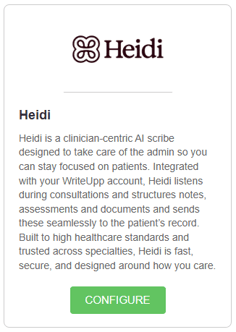
Once enabled, individual users can sign in to their own Heidi accounts within the widget, or create an account through it if needed. The Heidi widget can be found when creating a new note, document or assessment: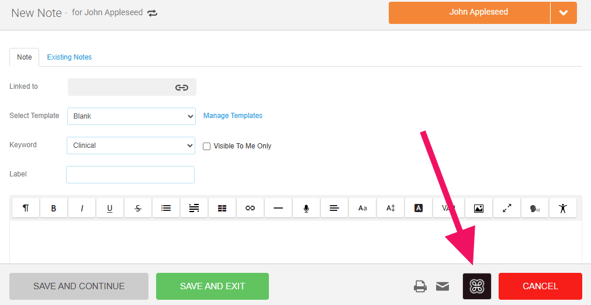
Important information:
-
The Heidi integration is available on eligible Heidi plans: Scribe Plus and Clinician for individuals, or Practice and Enterprise for teams.
-
To gain access to the integration, the WriteUpp integration must be added to your Heidi subscription via Heidi’s Integration Marketplace.
-
Each user who wants to use Heidi will need their own Heidi login credentials
To keep things simple, this can all be configured directly in WriteUpp through the Heidi Widget!
We know many users already rely on Heidi as part of their workflow, so we’re delighted to bring that experience directly into WriteUpp. However, for those looking for a lower cost alternative, our new built-in AI Scribe add-on also offers powerful AI-powered note creation without the need for a separate third party subscription.
Improvements
Same Name Alert
We’ve introduced a new Same Name Alert feature to help reduce accidental duplicate client records.
When creating a new client via Create → Client, Quick New Client from the appointment modal, or within the WriteUpp app, WriteUpp will now check for any existing clients with an exact name match. If a match is found, a pop up alert will appear so you can review the duplicate and decide whether to continue creating the new client, or switch to the existing client.
Please note: to access this feature in the WriteUpp app, users will need to download the latest version of the app from the app store.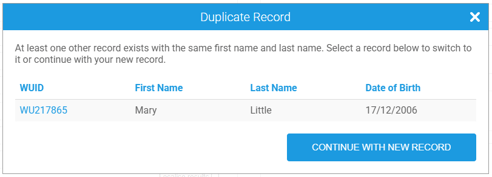
Patient Import Tool:
When importing patients using the Patient Import Tool, WriteUpp will also check for exact name matches. If duplicates are found, the alert will allow you to select which matching patient(s) you would still like to create.
Please note, this feature does not apply to Online Booking. To help prevent duplicate records through Online Booking, we’d always recommend enabling SMS or email verification.
Video call rejoining after ending a call
We’ve updated the behaviour when a host ends a video call using the End call button.
Previously, ending the call this way would finish the appointment and block further access to the call room. Now, the call room remains open until 30 minutes after the expected appointment end time.
This means that if a host accidentally ends the call, they can rejoin the same call room and admit participants back in.
Easier to identify third party contacts
When sending a DM or Smart Form, third party contacts are now easier to identify, with the contact name displayed after the organisation name in the recipient list.
Microsoft 365 Integration - Status Indicator
We’ve added a new status indicator to the Microsoft 365 integration screen under Integrations & Add Ons. This shows whether your Microsoft 365 calendar and/or email connection is active and valid.
If the token has expired or become invalid, affected features such as calendar sync or email sending may stop working until the connection is reauthenticated. You can do this by disconnecting your Microsoft 365 account in WriteUpp, and signing in again.
Improved Patient Import - space handling
We’ve improved the patient import process to automatically trim accidental leading and trailing spaces from imported text fields before matching and saving the data.
This means that responsible user matching is now more reliable, even where extra spaces exist in imported values or saved usernames on user profiles. Any legitimate internal spacing within fields will not be affected.
Patient Search Improvements
You can now search for patients using the Previous ID field, and paging has been added to help manage larger search result sets.
Bug Fixes
- Patient switching when creating new notes is now working again.
- Fixed an issue where a booking conflict could cause the wrong ‘next appointment’ to appear in confirmations for recurring appointments.
- In the AI Scribe modal, error messages no longer overlap the patient name.
- Added extra protection for Square payments in Online Booking to prevent rare cases where payment succeeds but the booking isn’t created.
- Video calls are now more reliable when using Apple Private Relay, with improved join handling and clearer participant activity logs behind the scenes.
- Fixed an issue where rescheduled video appointments could incorrectly show as ‘appointment already ended’ when joining a video call.
- Addressed an issue where the ##NEXTAPPVIDEO_LINK## variable could occasionally appear blank in some Online Booking video confirmations and reminders.
- If we detect that your audio or video has stopped working during a video call, you are prompted to restart it. We’ve improved the reliability of the warning pop-up shown when audio or video fails during a video call.