
AI Scribe is an AI-powered note taking feature that can be enabled for selected users on your WriteUpp site via an add-on.
It can be used when creating client notes, assessments, and documents, helping you save time and reduce administrative workload.
All users receive a 4 hour free trial of AI Scribe, so you can explore its features before deciding to subscribe to it! Learn how to assign the free trial here.
Each AI Scribe licence costs £23.95 per month (excl. VAT), and one licence is required for each user who needs access. For pricing in CAD and EUR, please refer to the Account page in your WriteUpp site or contact us via live chat.
You must have the Site Administrator user role to manage AI Scribe licences. If you have a different role, please contact your Site Administrator to assign you a licence or free trial.
Why add AI Scribe to your day-to-day routine?
AI Scribe is designed to streamline clinical documentation by turning conversations and session input into structured, professional notes.
Benefits include:
- Reducing time spent on manually writing notes
- Supporting faster completion of assessments and documentation
- Improving consistency and structure across client records
- Helping maintain focus during client sessions rather than note taking
- Reducing administrative burden at the end of the day
By integrating AI Scribe into your workflow, you can spend less time on paperwork and more time focusing on client care.
How to enable AI Scribe
1. Switch to Stripe Billing
To add AI Scribe licences to your subscription, you’ll need to be on Stripe Billing.
Note: If you currently pay via PayPal or GoCardless, you’ll need to switch to Stripe Billing before you can add AI Scribe licences.
Switching is simple, just follow the steps outlined here.
Once you’ve switched, or if you’re already on Stripe Billing, you can continue with the steps below.
2. Add AI Scribe licences to your subscription
1. Go to Settings → Account2. In your subscription settings, use the AI Scribe field to select how many licences you require.
Each user who wants to use AI Scribe will need a licence.
3. Click Update Subscription to save your changes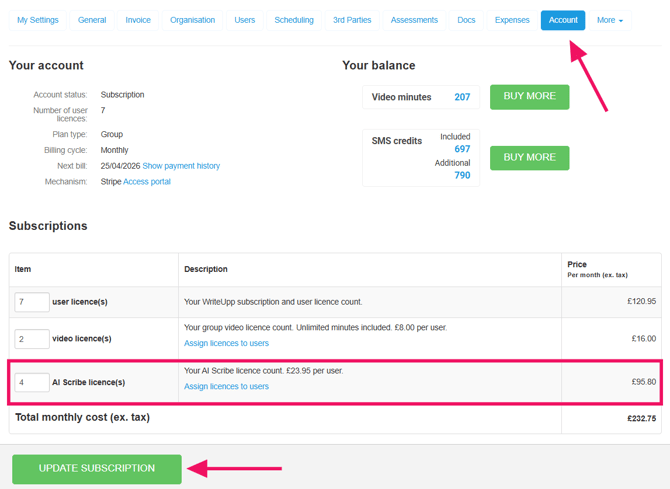
Important information: Changes to your subscription are handled using pro-rata billing. If you upgrade, you'll pay an additional cost for the remainder of your current billing cycle, with the charge added to your next invoice. If you downgrade, you’ll receive a credit for the unused portion, which will be deducted from your next invoice.
An AI Scribe licence must be assigned to a user before it can be used.
3. Assign your AI Scribe licences
1. Open the main menu and go to Integrations & Add-ons → AI Scribe → Configure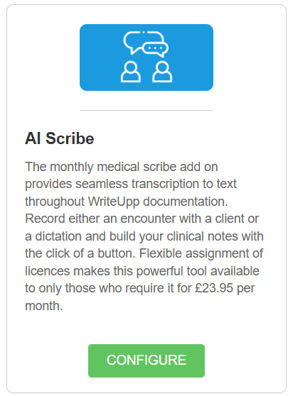
2. Enable AI Scribe using the switch, if needed. You'll then see a list of all users on the site
Warning: Enabling AI Scribe will upgrade your site to Redactor 3, which is required to use the feature. In WriteUpp, the Redactor is the text editor used when creating notes and documents. There are currently two versions: Redactor 2 and Redactor 3.
3. Use the dropdown next to each user to assign them an AI Scribe licence. Repeat this for all users who need access to AI Scribe.
You can also assign the 4 hour free trial to users from this screen.
Once assigned, the user will be able to use AI Scribe when creating notes, documents and assessments within WriteUpp.